Features

One record. Every next action.

Everything the job needs. See it, don’t just read about it. These are the real office and field screens your team would use, one step at a time.

Made for the field

Engineers finish the job, not the paperwork.

One app that logs time, mileage, photos and notes while the work happens, so nothing waits for the end of the day.

Field App

Everything for today, in one screen.

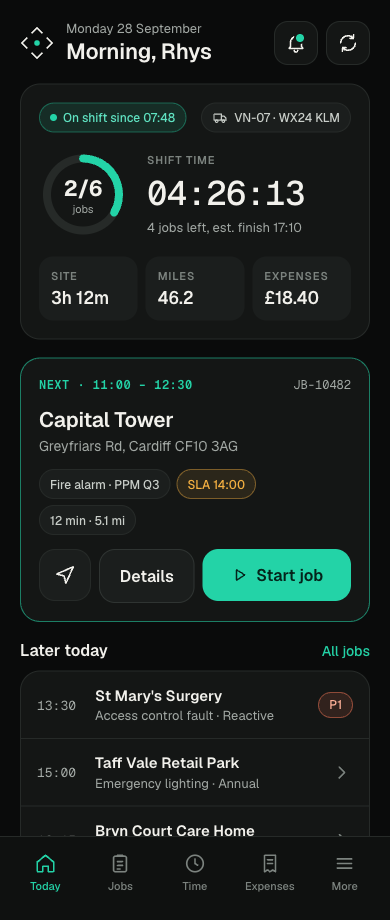
The engineer opens the app and sees their shift, the next job and what is left. Travel, time on site and expenses are tracked without anyone filling in a timesheet.

  • Shift time and jobs left, live
  • Next job with site, SLA and directions
  • Photos and notes captured on site
  • Apple and Android
“In 17 years as an engineer, this is the easiest app I’ve used. Time and mileage log automatically, photos and notes go in on site, and I’m done.”
Engineer, Volt Secure
The Today view in the Sentinel Vero field app

The Today view

Shift clock, jobs completed, miles and expenses at the top. Below it, the next job with the site address, the service type, the SLA time and a single button to start.

See Field App on your own jobs

Made for the office

Less rekeying. More quotes out the door.

The office sees every customer, job and recommendation in one place, with AI drafting the work nobody enjoys doing.

Core operations

The whole business on one dashboard.

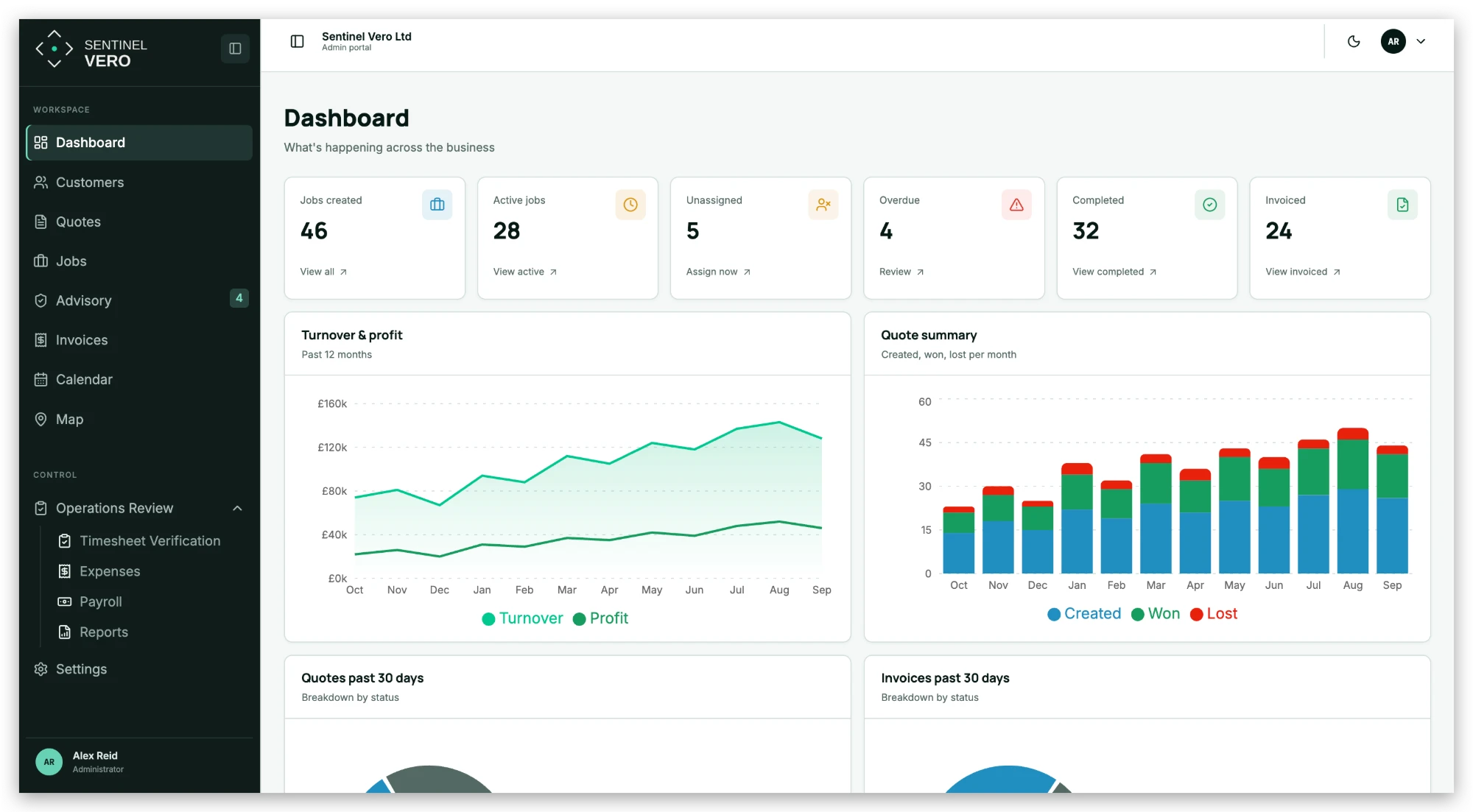
Customers, sites, enquiries, quotes, jobs and invoices share one record, so the dashboard is always the real picture, not last week’s spreadsheet.

  • CRM, contacts and sites
  • Enquiries through to jobs
  • Service and maintenance scheduling
  • Documents, compliance and reporting
“Quoting, compliance and payroll used to live in different places. Now it’s all in one system.”
Cai, Volt Secure
Sentinel Vero · Dashboard
Dashboard in Sentinel Vero

Dashboard

Jobs created, active, unassigned, overdue, completed and invoiced across the top. Turnover and profit over twelve months, and quotes created, won and lost each month.

See Core operations on your own jobs
AI Quoting

Drop in the plans. Get the first draft.

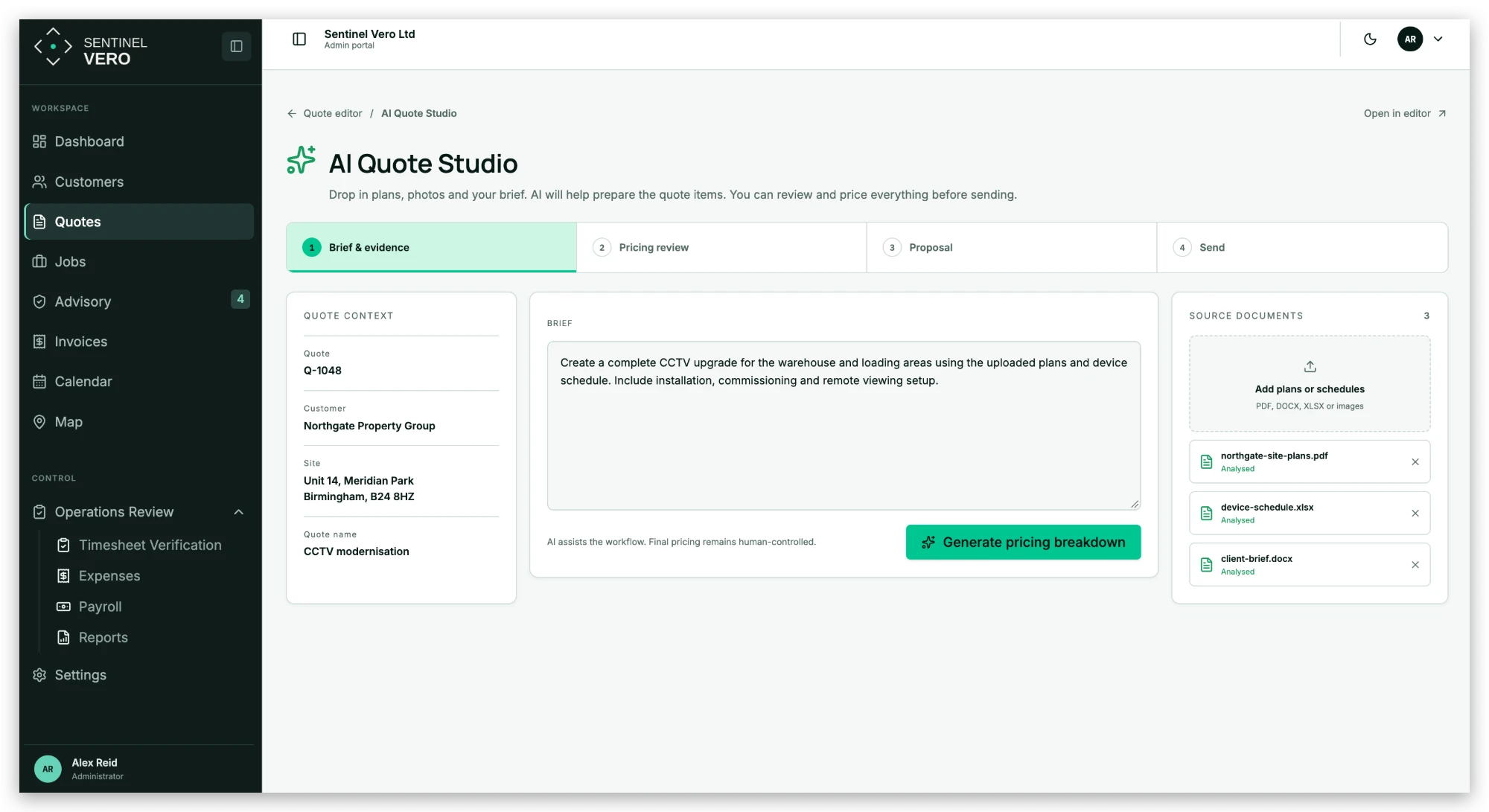
Add the brief, the site plans and the device schedule. The AI Quote Studio reads them and prepares the quote items. Your team reviews the pricing and sends it.

  • Reads PDFs, spreadsheets, documents and photos
  • Four clear steps from brief to send
  • Final pricing always stays with your team
Sentinel Vero · AI Quote Studio
AI Quote Studio in Sentinel Vero

AI Quote Studio

Quote context on the left, the brief in the middle and the analysed source documents on the right. One click generates the pricing breakdown, then it moves through pricing review, proposal and send.

See AI Quoting on your own jobs
AI Advisory

Every recommendation from site becomes a quote.

When an engineer spots extra work, it lands in the office with their notes and photos attached. AI turns it into a draft quote, so follow on work stops slipping through.

  • Engineer notes and photos kept exactly as submitted
  • AI drafted quote, reviewed before it goes
  • Pricing engine suggests margin and price
“The AI advisory analyses photos from our engineers on site to spot new work, so we win more revenue, faster.”
Cai, Volt Secure
Sentinel Vero · The advisory queue
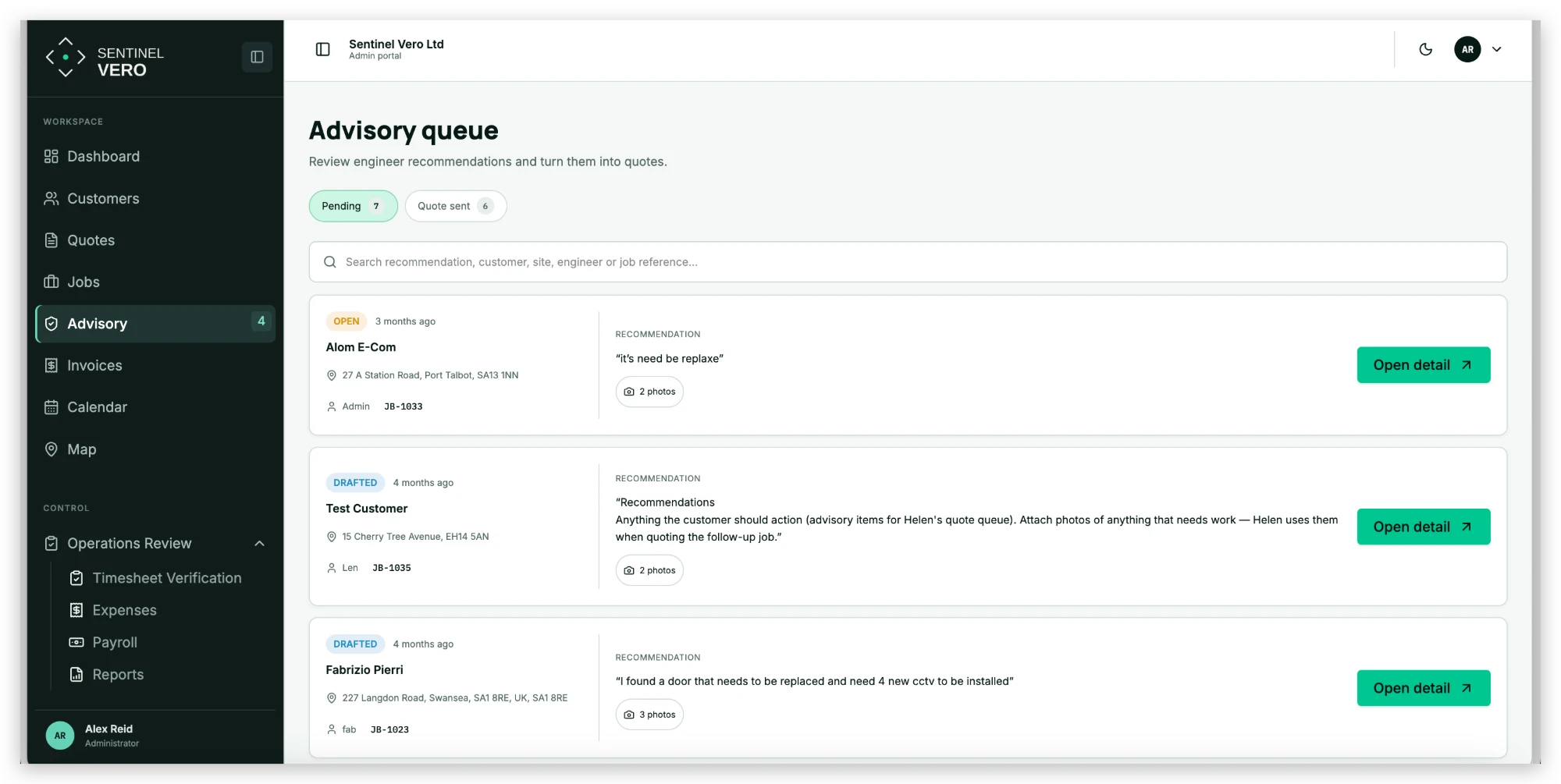
Step 1. The advisory queue in Sentinel Vero
01 / 03

Step 1. The advisory queue

Every recommendation from the field, with the customer, site, engineer, job reference and photos. Pending and quote sent tabs show what still needs action.

Sentinel Vero · The recommendation in detail
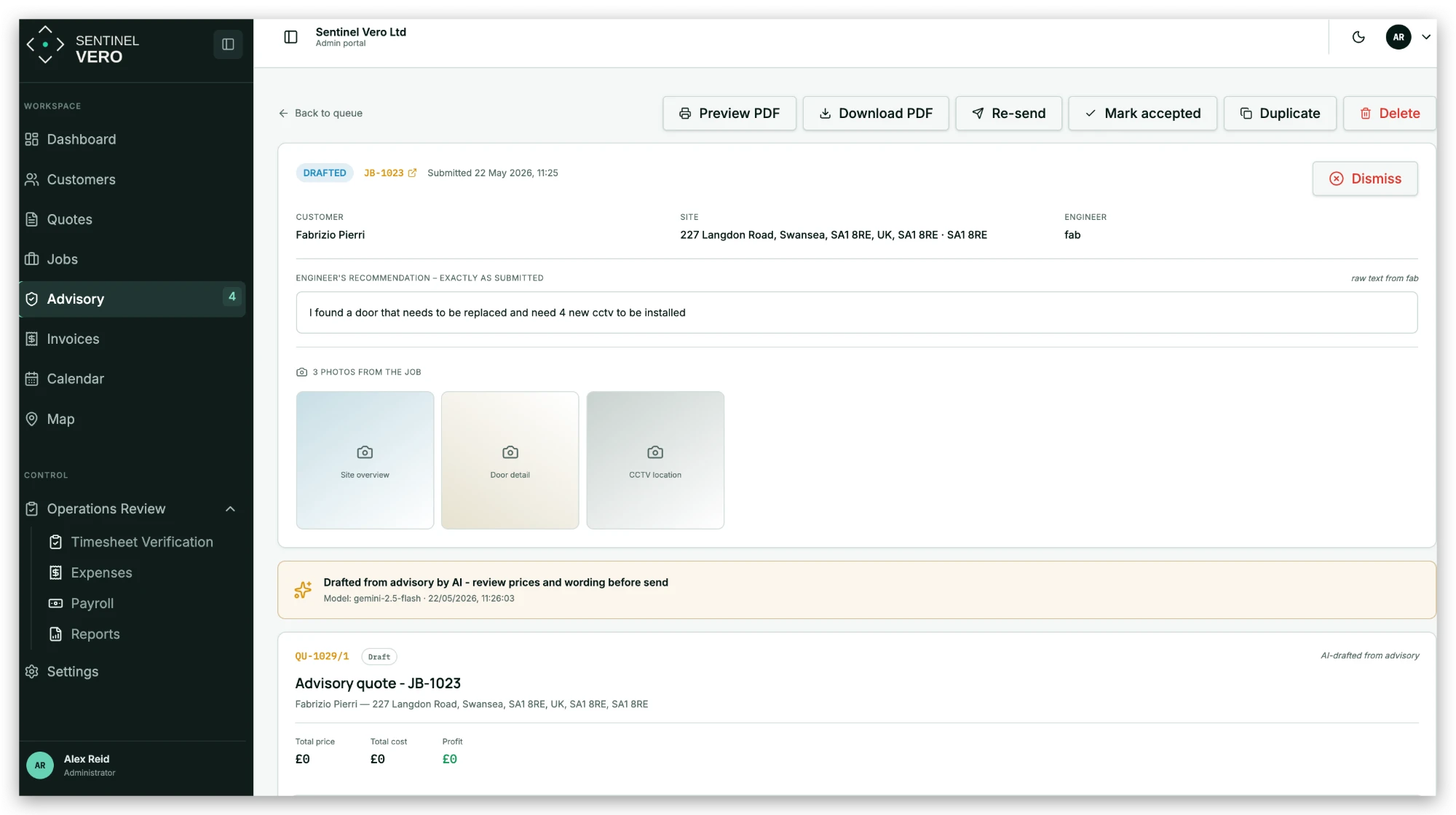
Step 2. The recommendation in detail in Sentinel Vero
02 / 03

Step 2. The recommendation in detail

The engineer’s words exactly as they wrote them, the photos from the job, and a quote already drafted by AI for the office to check.

Sentinel Vero · A quote ready to price and send
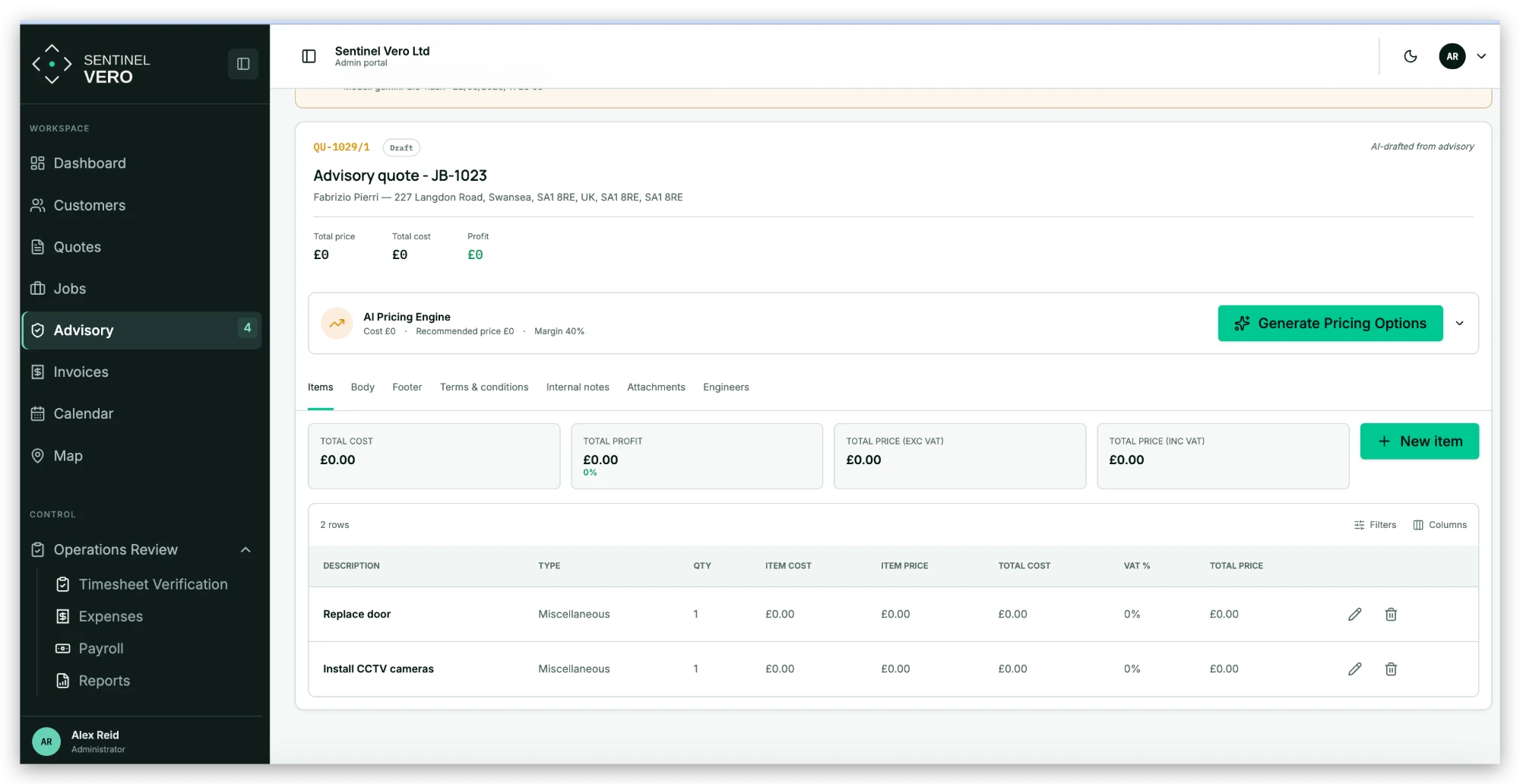
Step 3. A quote ready to price and send in Sentinel Vero
03 / 03

Step 3. A quote ready to price and send

The recommended work is already listed as quote lines. The AI pricing engine suggests options and margin before anyone presses send.

See AI Advisory on your own jobs

Made for owners and finance

Payroll you can sign off without a chase.

Time, mileage and expenses are checked by the system first, so you only look at what is actually wrong.

Time & Payroll

Verified hours, straight to payroll.

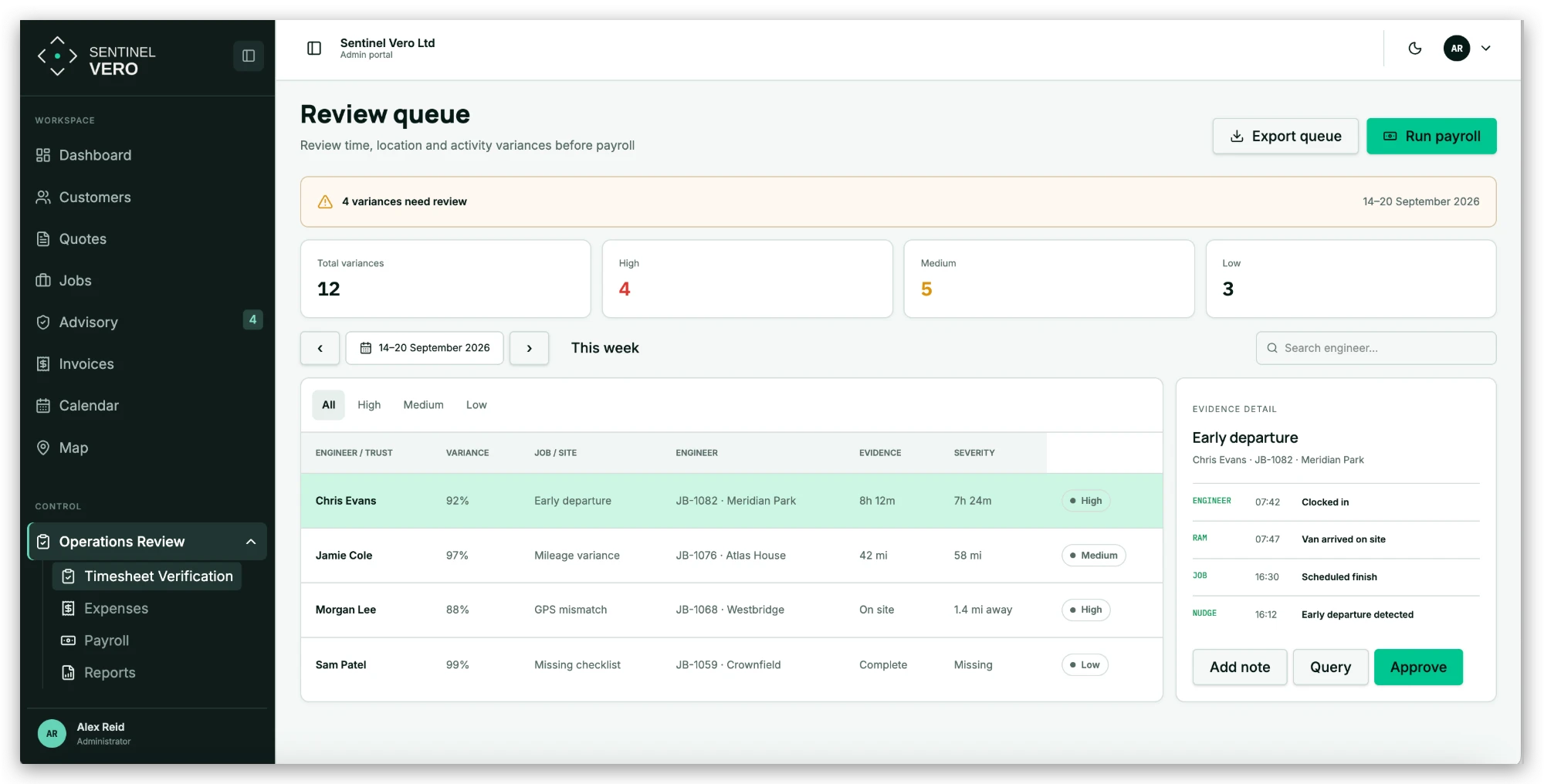
Engineer time is checked against clock in, van location and job times. Anything that does not match is flagged with the evidence, and everything else is ready to release.

  • Early departures, GPS and mileage variances flagged
  • Evidence timeline for every exception
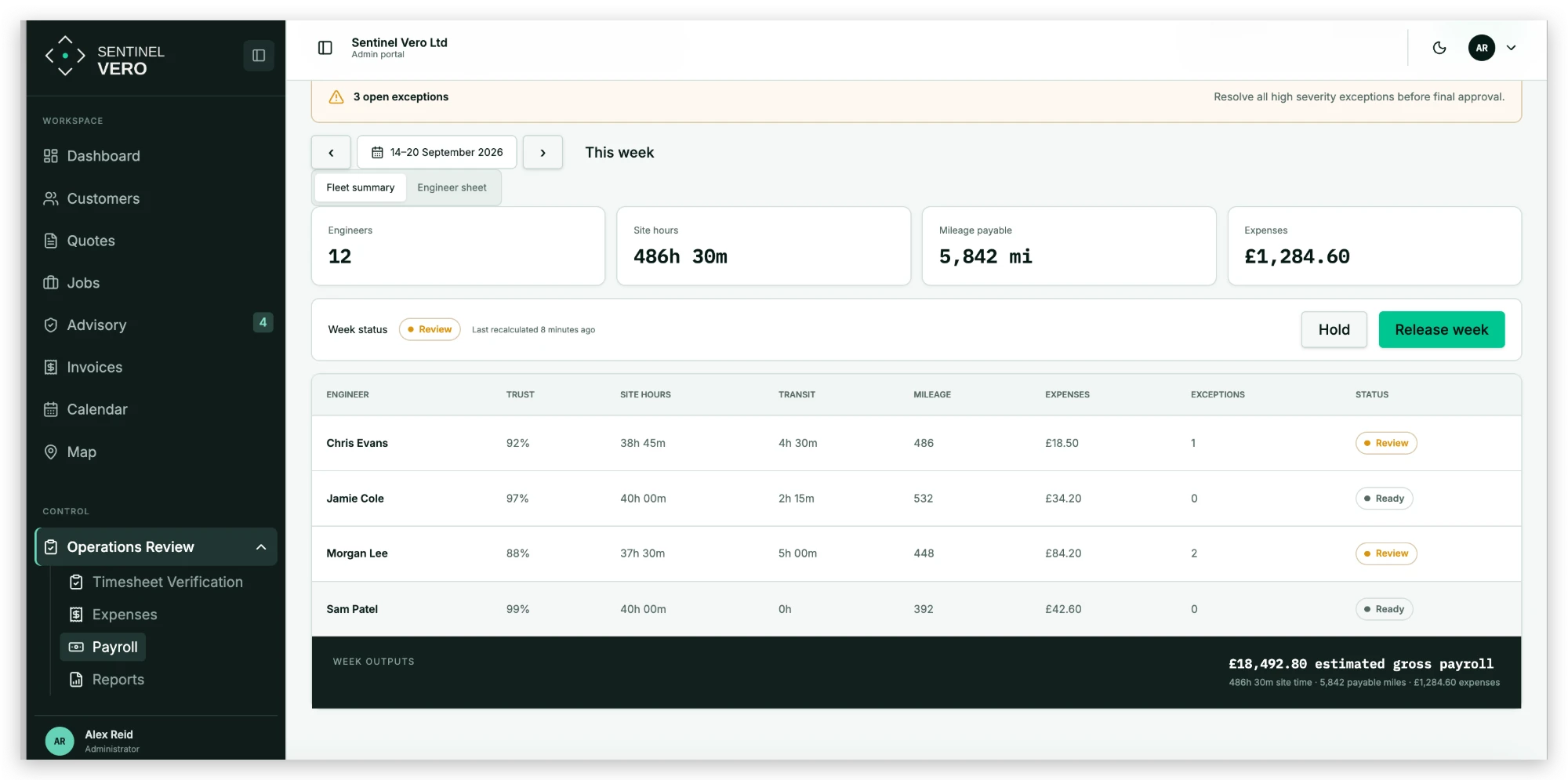
  • Weekly totals ready for Xero
“We used to spend hours checking timesheets and mileage before payroll. Volt verifies it for us, so by the time it reaches Xero, it’s already right.”
Cai, Volt Secure
Sentinel Vero · Review only the variances
Step 1. Review only the variances in Sentinel Vero
01 / 02

Step 1. Review only the variances

Variances ranked high, medium and low. Open one and see the evidence: clocked in, van arrived, scheduled finish, early departure. Approve, query or add a note.

Sentinel Vero · Release the week
Step 2. Release the week in Sentinel Vero
02 / 02

Step 2. Release the week

Site hours, payable miles and expenses for every engineer, with a trust score and status. When exceptions are cleared, release the week with the gross payroll already calculated.

See Time & Payroll on your own jobs

The evidence chain

From first enquiry to final payroll.

Every feature above shares one record, so nothing important disappears between the person doing the work and the person making the decision.

01

Customer

Every contact, site and asset starts with one reliable record.

02

Quote

Pricing logic, history and scope stay together. AI prepares the first draft.

03

Job

The accepted quote becomes work without rekeying the detail.

04

Field

Engineers capture time, evidence and decisions as the work happens.

05

Review

The office sees exceptions and missing evidence before the job closes.

06

Advisory

Likely next work is surfaced and becomes a quote ready to send.

07

Invoice

Approved work moves forward with its evidence still attached.

08

Payroll

Engineer time and mileage reach payroll without a monthly chase.

FAQs

What else do you need to know?

No pitch deck. Just your operation, on screen.

On a Discovery call we map how your quotes, jobs and payroll run today, then show you the platform doing the same work. If we are not the right fit, we will tell you.